S-Charts
S-Charts is an Obsidian plugin that draws a chart from a markdown table in your note, or from the properties of many notes. Charts use your theme's colours and redraw when you switch theme or turn on dark mode.
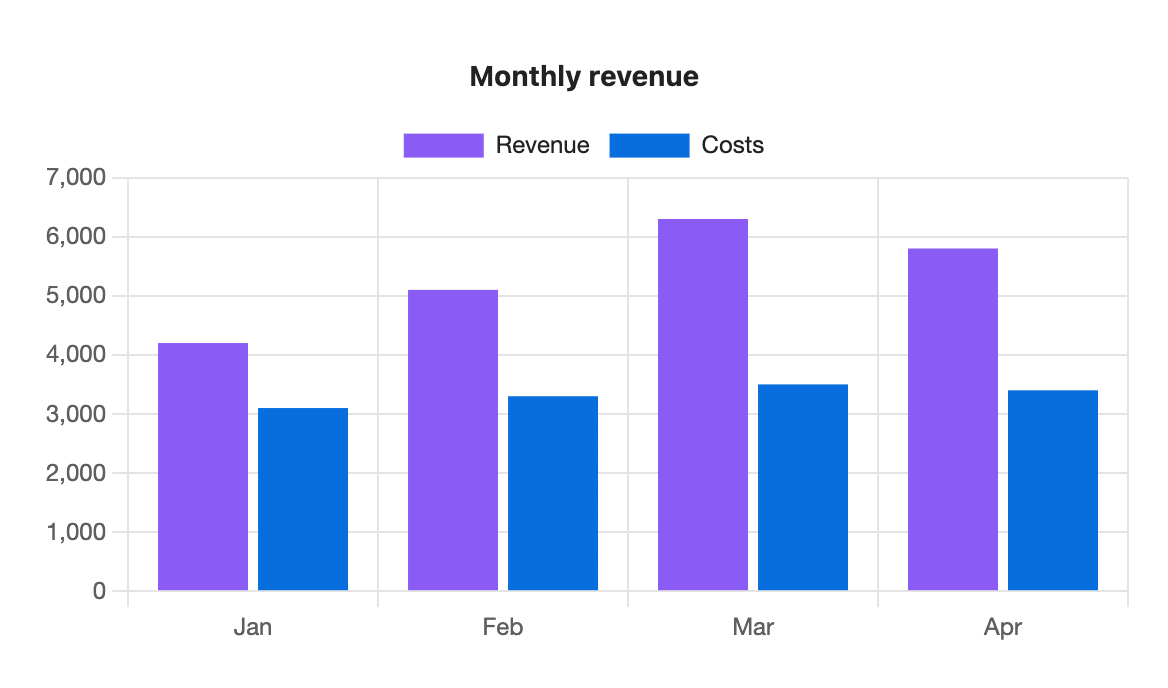
```s-chart
type: bar
title: Monthly revenue
---
| Month | Revenue | Costs |
| ----- | ------- | ----- |
| Jan   | 4200    | 3100  |
| Feb   | 5100    | 3300  |
| Mar   | 6300    | 3500  |
| Apr   | 5800    | 3400  |
```
What you can do
- Draw bar, line, area, pie, doughnut, scatter and radar charts from the same kind of table.
- Set a title, axis titles, the legend's position, the height, and stack or turn bars on their side. See the options reference.
- Use your theme's colours, a palette you define in settings, or colours for one chart only.
- Chart a property such as
weightacross every note with a tag or in a folder, and watch the chart update as you edit those notes. See charts from properties. - Export notes to PDF with every chart fully drawn. See PDF export.
How it works
A chart is a fenced code block with the language s-chart. The lines above --- are options. The markdown table below it is the data. The plugin reads the block each time the note renders and draws the chart in its place.
The block stays plain text in your note. If you turn the plugin off, you still have a readable table. The plugin never edits your notes and makes no network requests.
Where to start
Install S-Charts from Settings → Community plugins → Browse, then follow Your first chart. If you already have a table, jump to the page for the chart type you want.